
Do SIM Cards Go Bad? Everything You Need to Know
If you’ve ever had trouble with your phone suddenly not connecting to the network, you might have asked yourself: do SIM cards go bad? The short answer is yes – they can. While SIM cards are built to last, they’re still tiny electronic components that face wear and tear, environmental factors, and even software issues.
In this guide, we’ll break down the common causes of SIM card problems, how to recognize the symptoms, what to do if your SIM stops working, and how to keep it running smoothly for as long as possible.
What Exactly Is a SIM Card?
A SIM card (Subscriber Identity Module) is a small chip that stores your subscriber identity and allows your mobile device to connect to your carrier’s network. Whether you’re using a physical SIM card or an embedded SIM (eSIM), the SIM handles critical tasks such as:
- Phone calls
- Text messages
- Mobile data access
- Storing limited contacts and messages
Without a SIM, your phone is essentially just a smart device without the ability to connect to cellular services.
Do SIM Cards Go Bad Over Time?
Yes, SIM cards can go bad. While many older SIM cards still function after several years, they are not immune to failure. Wear and tear, frequent insertion, and exposure to environmental factors can slowly degrade performance.
Unlike batteries, SIMs don’t have a set expiration date. Instead, their lifespan depends heavily on usage and handling.
Average Lifespan of a SIM Card
On average, a physical SIM card lasts between 5–10 years if handled properly. However, users often replace them earlier due to:
- Upgrading to a new device
- Switching carriers
- Needing support for new network technologies (like 5G)
- Experiencing sim card wear or connectivity issues
So while your SIM might technically still work, it could become outdated before it physically fails.
Common Symptoms of a Failing SIM Card
How can you tell if your SIM is failing? Watch for these common symptoms:
- Frequent call drops or signal loss.
- “Invalid SIM” or “No SIM” error messages.
- Inability to connect to mobile data.
- Delays when sending or receiving text messages.
- Poor connectivity even in strong network areas.
- Complete loss of service despite using a working SIM before.
If you notice multiple symptoms at once, it’s usually a sign that your SIM is going bad.
Why Do SIM Cards Fail?
There are several reasons a SIM card may fail. Let’s look at the most common causes:
-
Physical Damage
Scratches, cracks, or external damage to the SIM’s electronic component can render it useless. Even a tiny bit of bending can cause failure.
-
Environmental Factors
Extreme temperatures, excessive heat, or water exposure can corrode or short-circuit the SIM. This is especially risky if you leave your phone in hot cars or damp environments.
-
Manufacturing Defects
Some SIMs have hidden manufacturing defects that don’t appear until months or years later.
-
Frequent Insertion and Removal
Switching your SIM between different phones or new devices too often can accelerate sim card wear.

-
Software Issues
Sometimes it’s not the SIM at all. Outdated phone’s software, incorrect network settings, or software glitches may trigger “No SIM” messages.
- Carrier Deactivation
Even if the card itself is fine, carriers sometimes deactivate older SIMs when they shut down outdated networks (like 2G). What looks like SIM failure may simply be network retirement.
Do SIM Cards Store Data?
Yes, SIM cards can store a limited amount of data—like contacts, text messages, and saved Wi-Fi passwords. However, modern phones mostly rely on cloud storage.
That means even if you face sim card failure, your data is typically safe on your phone or in your online accounts.
Troubleshooting Steps for SIM Card Issues
Before replacing your SIM, try these troubleshooting steps:
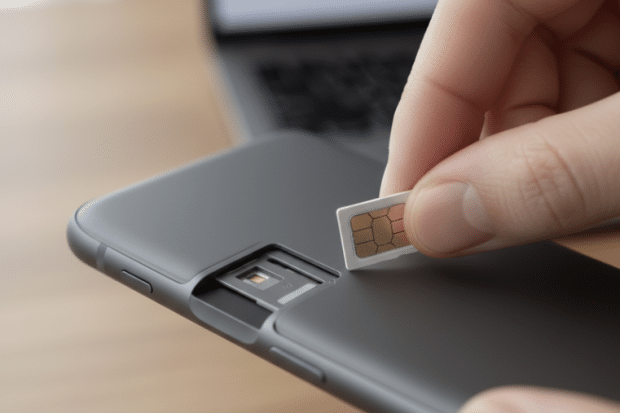
- Ensure the SIM is properly inserted into the SIM tray.
- Remove it and clean gently with a lint free cloth or isopropyl alcohol.
- Restart your phone or reset network settings.
- Test it in a different phone to rule out device issues.
- Update your phone’s software to prevent bugs.
Often, these simple actions can bring a bad SIM card back to life, at least temporarily.
SIM Card Issues vs. Phone Issues
A lot of users mistake device problems for SIM card issues. For example:
- If your iPhone or Android only loses signal in one location, it’s likely network coverage, not the physical SIM card.
- If apps crash but calls and texts still work, that’s a software problem, not the SIM.
- If a SIM works fine in one device but not in another, the phone’s SIM reader may be at fault.
It’s important to test the SIM in more than one phone before assuming it’s the culprit.
When to Replace Your SIM
If the above steps don’t work, you’ll likely need a replacement SIM card. A faulty SIM can lead to persistent issues, including complete loss of service.
👉 Need a reliable solution abroad? Order your international SIM card today
What Happens If You Don’t Replace a Bad SIM?
Ignoring a failing SIM can lead to:
- Missed calls and messages.
- Inconsistent data connectivity.
- Higher risk of losing access while traveling.
- Potential issues when authenticating 2FA codes that rely on SMS.
For many users, the frustration outweighs the small cost of a replacement SIM.
The Risk of Using an Old SIM Card
Using an older SIM card might not cause issues right away, but risks increase over time:
- Poor connectivity on modern networks.
- Slower mobile data speeds.
- Inability to fully access 4G or 5G.
- Increased chance of error messages.
If your SIM is over 5 years old, ask your carrier for an upgrade.
Can a Bad SIM Affect Calls and Messages?
Yes, a bad SIM card can affect calls, data, and messages. Problems include:
- Dropped calls
- Delayed texts
- Failed internet connections
- Random connectivity issues
Since these issues can also mimic network problems, testing your SIM in another device is a smart first step.
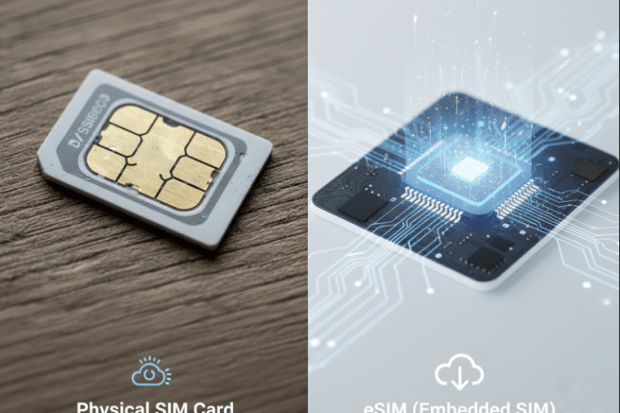
SIM Card vs. eSIM: Do They Go Bad the Same Way?
With the rise of eSIMs, some users wonder if digital SIMs also “go bad.”
- Physical SIM: Can wear out, get damaged, or stop working.
- eSIM: No physical wear, but still vulnerable to software issues or carrier deactivation.
Both are reliable, but eSIM eliminates risks from frequent insertion or external damage.
Does a SIM Card Affect Internet Speed?
A SIM card doesn’t directly control speed, but an older sim card may not support newer frequency bands. That means your data plan might be fast, but your outdated SIM holds you back.
👉 Want to maximize data efficiency while traveling? Compare our rates
Preventing SIM Card Wear
You can extend the life of your SIM card by:
- Avoiding frequent removal.
- Protecting your phone from excessive heat and water exposure.
- Handling with care when switching devices.
- Using a protective case to reduce external damage.
Can You Transfer a SIM to a New Device?
Yes, but not always smoothly. A SIM that worked in one phone may struggle in a new device, especially if it’s outdated.
If your new phone doesn’t recognize it, ask your carrier for a replacement SIM.
SIM Card Myths Debunked
There are plenty of myths about SIM cards. Let’s set the record straight:
- Myth: SIM cards last forever.
- Fact: They eventually fail due to wear and tear.
- Myth: A SIM can store all your photos and data.
- Fact: They only hold limited contacts and messages.
- Myth: Cleaning your SIM with water works.
- Fact: Always use a lint free cloth or isopropyl alcohol only.
Travel Tip: Don’t Rely on Just One SIM
If you travel frequently, depending on a single older SIM card is risky. A sudden sim card failure abroad could leave you without access to calls, data, and messages.
👉 That’s why many travelers carry a backup. Get your international SIM card and stay connected no matter what.
Final Thoughts: Do SIM Cards Go Bad?
So, do SIM cards go bad? Yes, but not instantly. Over time, physical damage, software issues, and wear and tear can cause them to fail.
If you notice error messages, connectivity issues, or call drops, it may be time for a replacement SIM.
The good news? Replacing a SIM is simple, affordable, and restores seamless calls, data, and texts.
✅ Traveling soon? Get your international SIM card today and stay connected without interruptions.